 ChatShell
Ask a question. ChatShell does the legwork.
The everyday AI app that looks things up on the web and works through your files, so it can plan a trip, compare what to buy, or tidy a folder.
You connect your own AI key, or a free model on your computer. A ChatGPT or Claude subscription can't be used. How that works
Version 0.12.0 for macOS, Windows, and Linux, with an iPhone and iPad beta. Free and open source.
Works with
- OpenAI
- Anthropic
- Google Gemini
- DeepSeek
- xAI
- Mistral
- MiniMax
- Moonshot
- Z.ai
- and 30+ more


Free models on your computer
- Ollama
- LM Studio
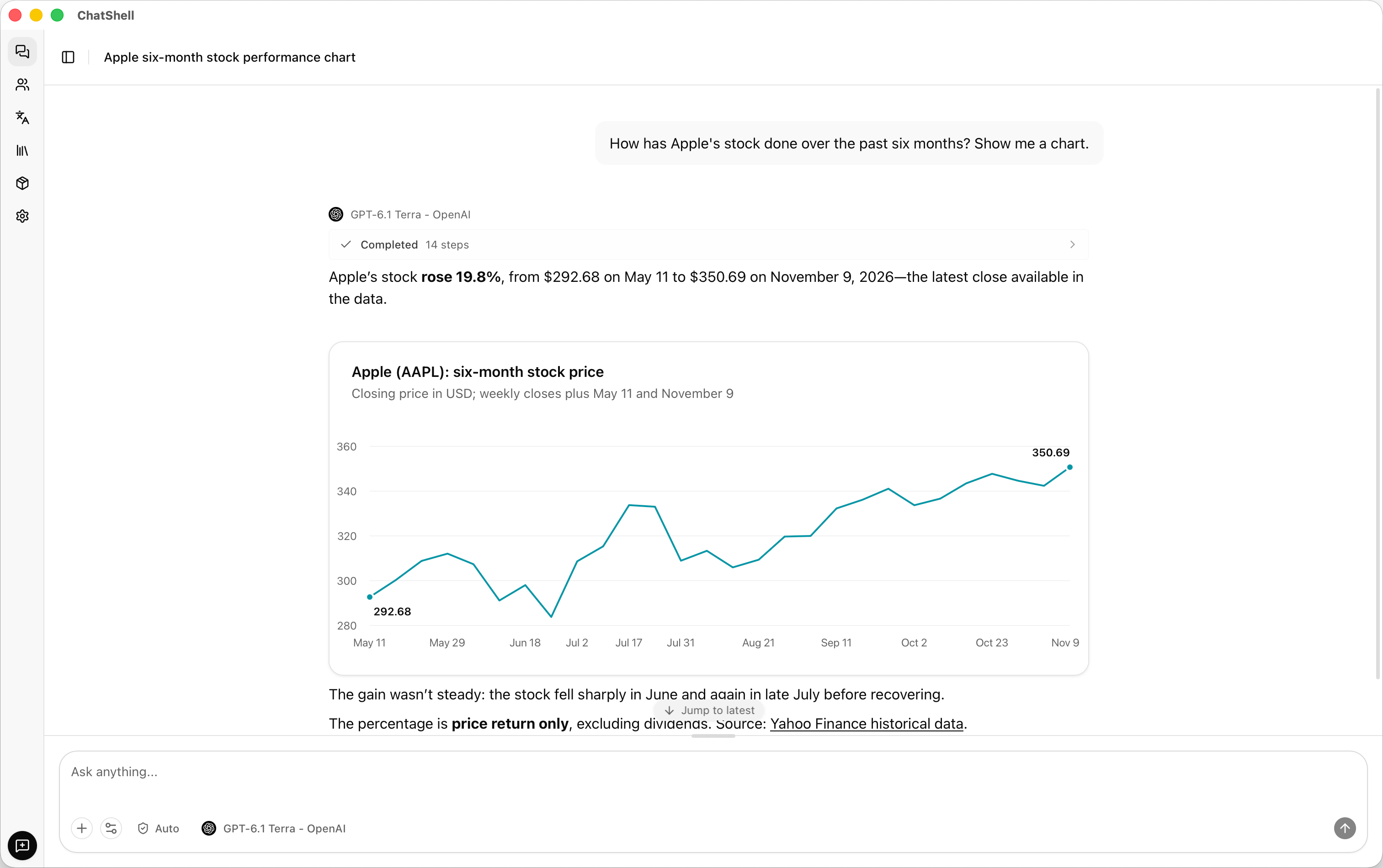
Check a stock
“How has Apple's stock done over the past six months? Show me a chart.”
14 steps, on its own: 3 web searches 3 pages read 3 downloads 2 computer tasks 3 safety checks by Auto mode
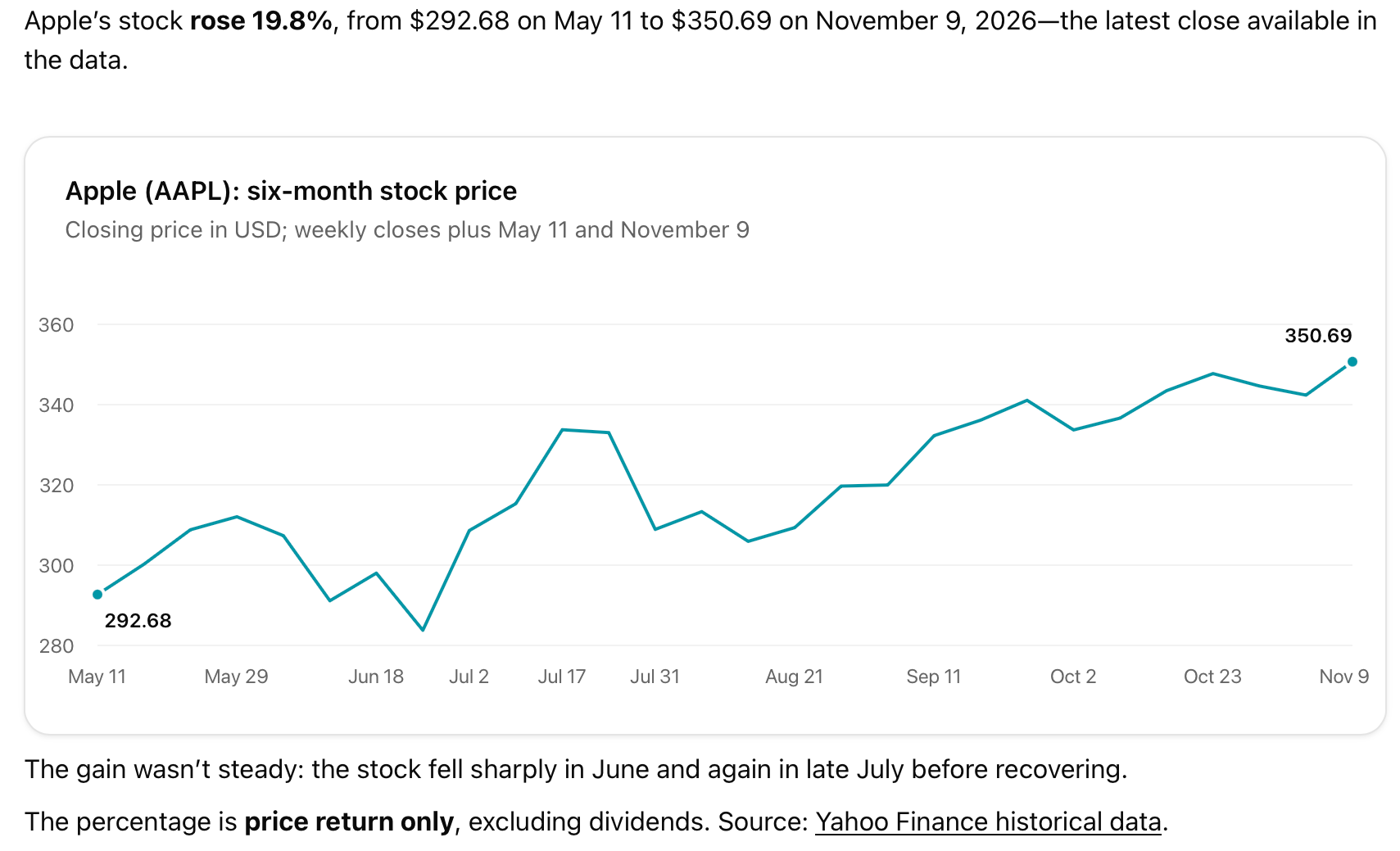
Apple’s stock rose 19.8%, from $292.68 on May 11 to $350.69 on November 9, 2026—the latest close available in the data.
Read a spreadsheet
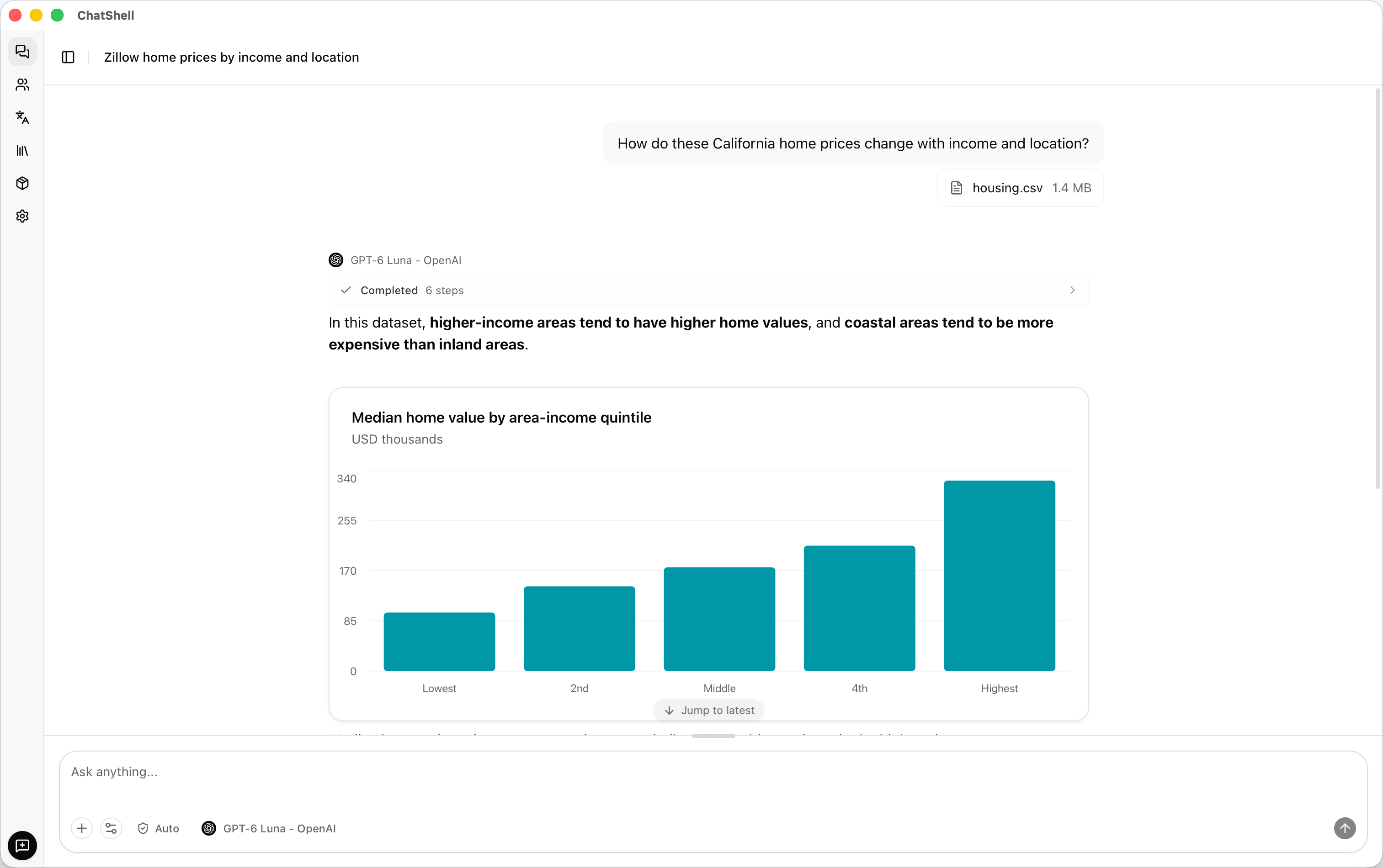
“How do these California home prices change with income and location?”
6 steps, on its own: 3 computer tasks 3 safety checks by Auto mode
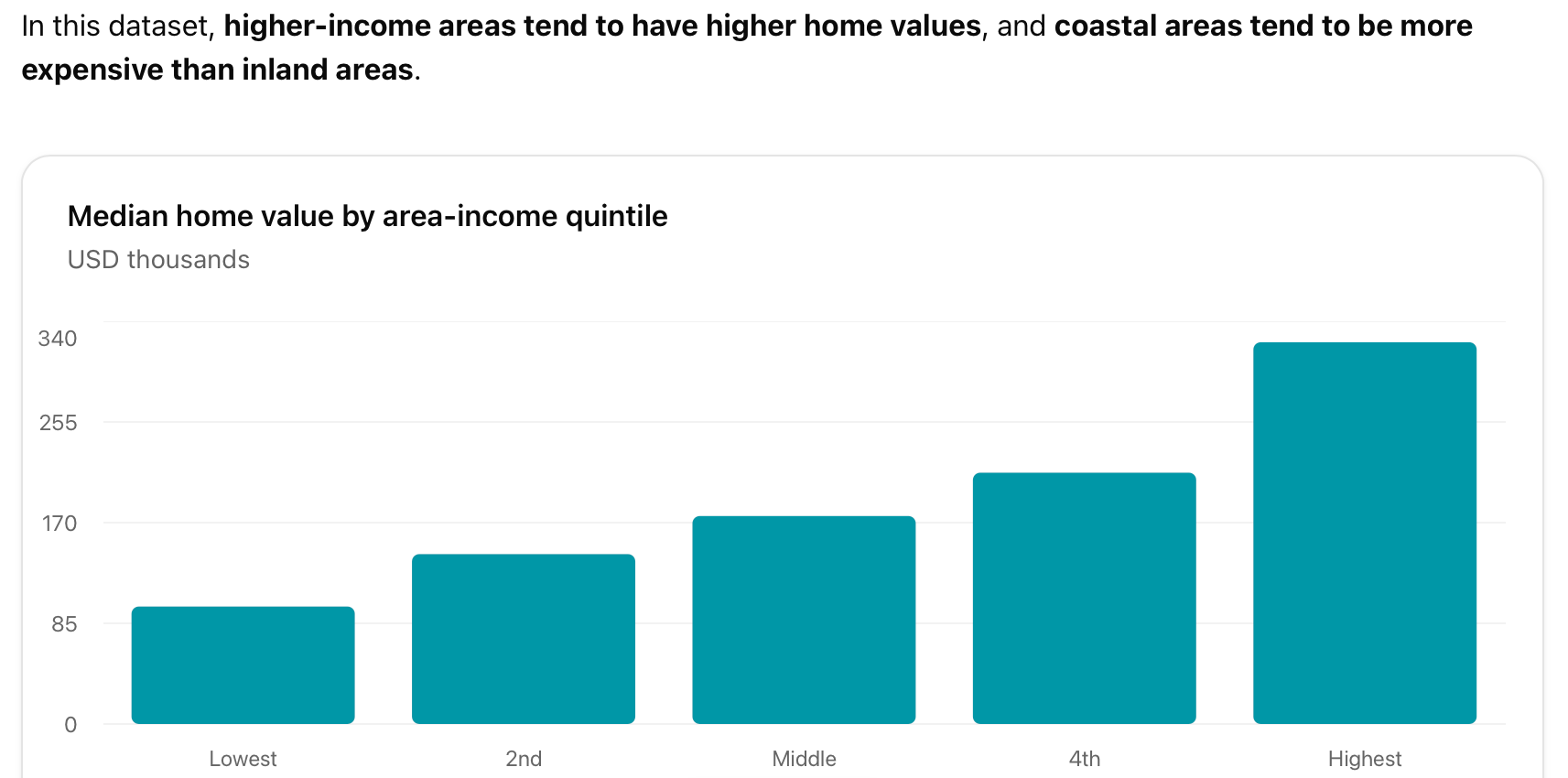
In this dataset, higher-income areas tend to have higher home values, and coastal areas tend to be more expensive than inland areas.
Plan a trip
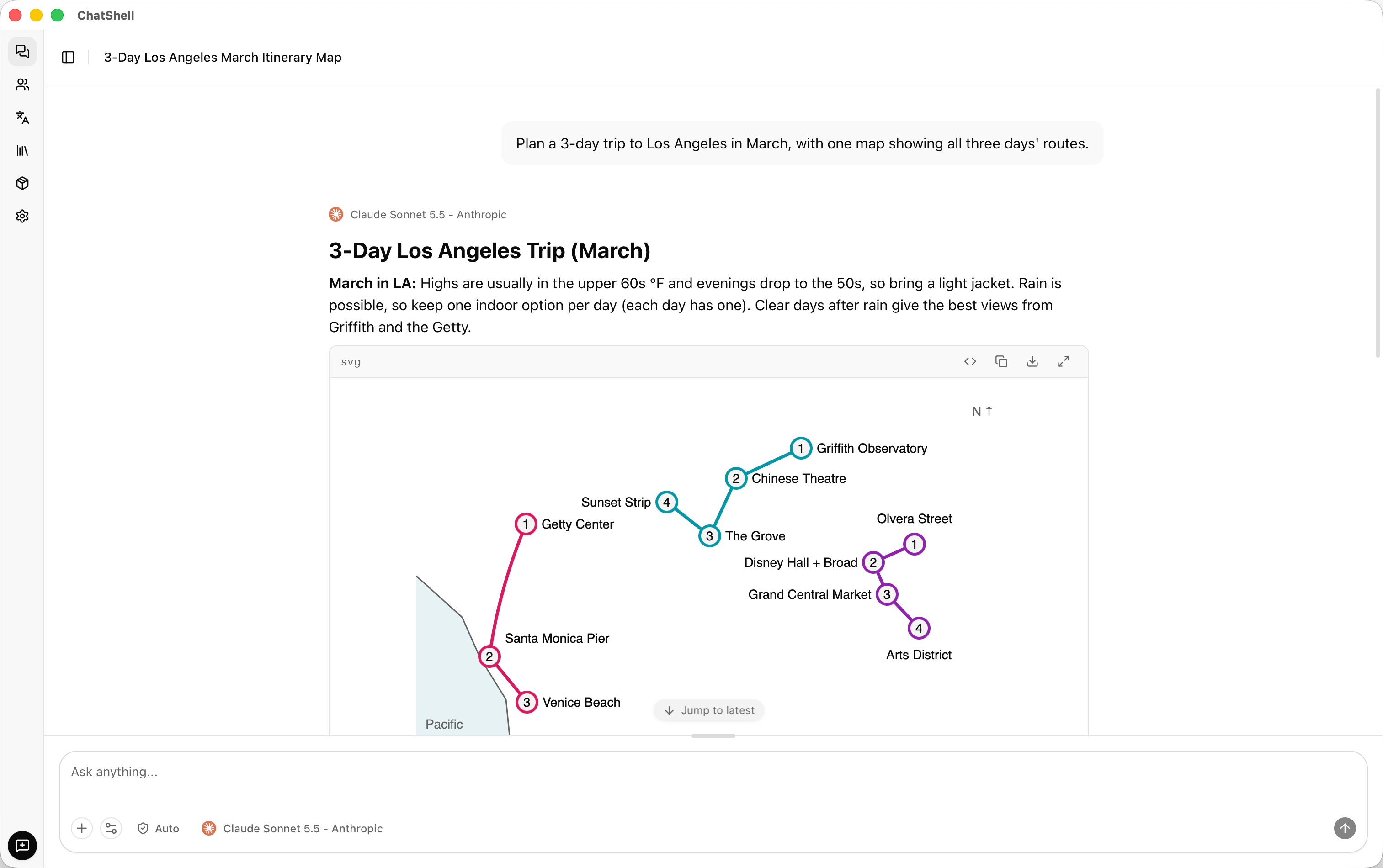
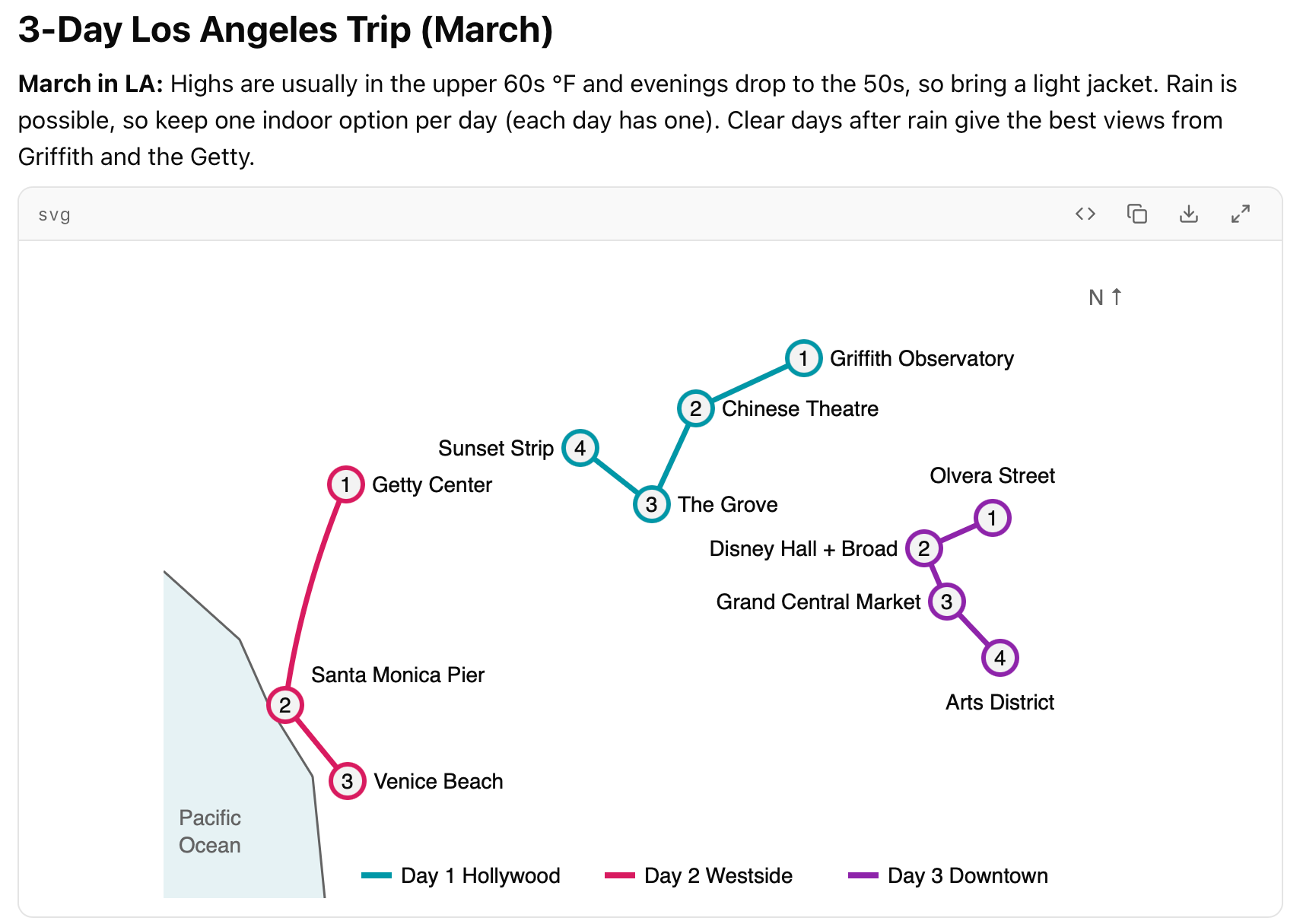
“Plan a 3-day trip to Los Angeles in March, with one map showing all three days' routes.”
No lookups needed: answered from what the model already knows.
March in LA: Highs are usually in the upper 60s °F and evenings drop to the 50s, so bring a light jacket. Rain is possible, so keep one indoor option per day (each day has one). Clear days after rain give the best views from Griffith and the Getty.
Things to ask
Paste one of these into ChatShell to see what it does. Results depend on the AI model you connect.
-
Understand a document
“Explain this lease in plain English. What should I watch out for?”
Reads the PDF you attach, even a scanned one.
-
Choose what to buy
“Compare three robot vacuums under $400. Which should I buy?”
Reads reviews and product pages, then lays out the trade-offs.
-
Plan meals
“Plan five dinners using rice, eggs, and chicken, and save me a shopping list.”
Saves the shopping list as a file and tells you where it is.
-
Tidy up files
“Look through my Downloads folder and suggest how to organize it. Wait for my approval before moving anything.”
Looks through your folder and asks before it moves a thing.
Every step, out in the open
ChatShell decides what it needs to look up or work out, then does it, and you can see each action as it happens. These are replays of the conversations above.
You
How do these California home prices change with income and location?
housing.csv 1.4 MB attached
GPT-6 Luna via OpenAI
In this dataset, higher-income areas tend to have higher home values, and coastal areas tend to be more expensive than inland areas.
Median home value by area-income quintile
USD thousands
| Area-income quintile | USD thousands |
|---|---|
| Lowest | $99K |
| 2nd | $143K |
| Middle | $176K |
| 4th | $212K |
| Highest | $322K |
A real conversation, replayed: the AI decided on its own to take these 3 actions before answering; with Auto mode's 3 safety checks, the app counts 6 steps. The answer is quoted from the app, and its chart redrawn from the same numbers.
You
How has Apple's stock done over the past six months? Show me a chart.
GPT-6.1 Terra via OpenAI
Apple’s stock rose 19.8%, from $292.68 on May 11 to $350.69 on November 9, 2026—the latest close available in the data.
Apple (AAPL): six-month stock price
Closing price in USD; weekly closes plus May 11 and November 9
| Date | Closing price in USD; weekly closes plus May 11 and November 9 |
|---|---|
| May 11 | $292.68 |
| May 15 | $300.23 |
| May 22 | $308.82 |
| May 29 | $312.06 |
| Jun 5 | $307.34 |
| Jun 12 | $291.13 |
| Jun 18 | $298.01 |
| Jun 26 | $283.78 |
| Jul 2 | $308.63 |
| Jul 10 | $315.32 |
| Jul 17 | $333.74 |
| Jul 24 | $333.02 |
| Jul 31 | $308.91 |
| Aug 7 | $313.33 |
| Aug 14 | $305.93 |
| Aug 21 | $309.35 |
| Aug 28 | $319.70 |
| Sep 4 | $319.97 |
| Sep 11 | $332.27 |
| Sep 18 | $336.13 |
| Sep 25 | $341.07 |
| Oct 2 | $333.69 |
| Oct 9 | $336.64 |
| Oct 16 | $343.46 |
| Oct 23 | $347.73 |
| Oct 30 | $344.63 |
| Nov 6 | $342.37 |
| Nov 9 | $350.69 |
A real conversation, replayed: the AI decided on its own to take these 11 actions before answering; with Auto mode's 3 safety checks, the app counts 14 steps. The answer is quoted from the app, and its chart redrawn from the same numbers.
What it can do
The AI picks these up by itself when a question needs them, and every step shows in the conversation.
On the web
Search engines are built in; there is nothing extra to sign up for.
On your computer
On Mac, Windows, and Linux. The iPhone and iPad app sticks to the web.
And the everyday parts
- Attach anything.
- PDFs, Word, Excel, spreadsheets, images, videos, a folder, or a link to a page. Type @ to pick a file.
- Undo file changes.
- See which files each reply made or changed, and put them back with one click.
- Find old answers.
- Search every past conversation and jump to the message.
- Try another direction.
- Branch a new conversation from any reply.
- Translate.
- A side-by-side view that knows your languages, with a history kept on this device. Keep asking about it in a chat.
- Save and share.
- Export a reply as a document or a conversation as an image.
- Reuse what works.
- Save prompts and assistants for things you do often.
- Charts and diagrams.
- Charts, figures, formulas, flowcharts, and tables display properly.
- English and Chinese.
- The app follows your system language.
Get started
About five minutes, most of it spent getting a key from an AI provider. You pay the provider directly for what you use.
- 1
Download ChatShell
Free, for macOS, Windows, and Linux, with an iPhone and iPad beta.
Pick your download - 2
Connect an AI provider
Create an API key with a provider such as OpenAI, Anthropic, or Google and paste it into Settings, or run a free model on your own computer with Ollama or LM Studio. A ChatGPT or Claude subscription doesn't include an API key, so it can't be used here.
Supported providers and where to get a key - 3
Pick a model and ask
Choose a model that can use tools; ChatShell shows which ones can. Then ask something from the list above.
Getting started guide
Your conversations stay yours
Everything lives on your computer. Turn on sync to continue a conversation on your iPhone or iPad, now in beta. Join on TestFlight
- On your computer
- Your conversations, assistants, prompts, and attachments. API keys are stored encrypted, locked by your system keychain.
- With your AI provider
- The messages you send, as with any AI app. Pick a model that runs on your own computer and nothing leaves it.
- In your iCloud Drive, if you turn on sync
- Encrypted copies that only your own devices can open; not Apple, not us. Turning sync off deletes nothing.
- With us
- Nothing. There is no ChatShell account and no tracking. Update checks send only what is needed to compare versions.
You decide what it can do
Three modes, switchable in any conversation. On Mac and Linux, Ask and Auto run commands inside the system sandbox, so they can only change the folders you allow.
- Ask
- ChatShell asks you first before it changes a file or a command reaches beyond the sandbox. On Windows, which has no sandbox, it asks before every command.
- Auto
- The AI reviews each step before it runs and goes ahead with the safe ones. You see why, and can run a blocked step anyway. New conversations start here, or in Ask if the model cannot review steps.
- Yolo
- Every step runs without asking and outside the sandbox. ChatShell confirms before you switch.
- In every mode
- Commands that could wreck your computer, such as erasing the disk, are blocked, and the AI cannot read the data ChatShell keeps for itself. You can also give a conversation one folder to work in.
For power users
The details, if you want them. Everything is covered in the docs.
- Any model
- 40+ providers, including OpenAI, Anthropic, Google Gemini, DeepSeek, and OpenRouter, any OpenAI- or Anthropic-compatible endpoint, and local models through Ollama or LM Studio.
- MCP servers
- Connect tool servers over STDIO or HTTP, with OAuth sign-in. Paste a Claude Desktop or Cursor config to import it.
- Skills
- Install a SKILL.md from a GitHub link or write your own; it loads only when the model needs it.
- Assistants
- Bundle a model, instructions, tools, and skills under one name.
- Helper models
- Hand titles and summaries to a cheaper model, and images to a vision model.
- Open source
- Apache 2.0, built with Tauri and Rust. Updates are signature-checked before install.
When something else fits better
ChatShell isn't the right app for everyone.
- If you'd rather not manage API keys, the official ChatGPT or Claude apps give you their models for a flat monthly price, with extras such as memory and voice.
- If you want a longer-established app with a bigger community, try Cherry Studio, Msty, or Chatbox.
Side-by-side comparisons:
Download ChatShell
Version 0.12.0. Free and open source under the Apache 2.0 license.
- Download .dmg
macOS Your device
Apple Silicon and Intel (Universal). macOS 11 or later.
Signed and notarized, so it opens without security warnings.
- Download .msi
Windows Your device
64-bit. Windows 10 or later.
Not code-signed yet. If SmartScreen warns you, choose More info, then Run anyway.
- Download .AppImage
Linux Your device
x86_64. Major distributions, packaged as an AppImage.
Make it executable before running it:
chmod +x ChatShell_*.AppImage - Join on TestFlight
iPhone and iPad Your device
iOS 18 or iPadOS 18 or later.
Beta through TestFlight. Connect your own AI provider key; conversations sync with your Mac over iCloud.